15+ High-Converting Referral Message Examples for Shopify Merchants
Your customers already love your products. They tell friends about them over coffee, share photos on Instagram, and recommend your store in Facebook groups. But most of these valuable word-of-mouth moments happen without you knowing, and without any structured way to track or reward them.
Referral messages bridge this gap. They transform casual recommendations into measurable, profitable customer acquisition channels. The difference between a store that grows through paid ads alone and one that builds a self-sustaining referral engine often comes down to the quality of these messages.
This guide focuses on the exact wording, timing, and automation strategies that turn referral programs from “nice to have” into revenue drivers. You’ll find store-ready templates mapped to specific customer touchpoints, along with personalization tactics and testing frameworks that Shopify merchants can implement today.
Why High-Quality Referral Messages Drive Ecommerce Growth?
Direct Link to Shopify Metrics
Referral customers behave differently than those acquired through paid channels. They convert at higher rates, spend more per order, and stick around longer. Here’s what the data shows:
- Average Order Value (AOV): Referred customers typically spend 15-25% more than paid traffic customers. They arrive with built-in trust from their friend’s recommendation, making them more confident in their purchase decisions.
- Repeat Purchase Rate: Studies show referred customers have a 37% higher retention rate. They’re not just one-time buyers testing out a discount code. They’re genuinely interested in your brand because someone they trust vouched for you.
- Customer Acquisition Cost (CAC): While Facebook ads might cost you $30-50 per customer, referral programs typically run at $10-15 per acquisition. Some stores report 3-5× ROI compared to paid advertising, with the added benefit that each referred customer can become a referrer themselves.
Importance for Shopify Merchants
Most Shopify stores have referral programs installed but barely touch the messaging. They use default templates from apps, send them at random times, and never test different approaches.
This represents massive missed revenue. A store doing $50K monthly could unlock an additional $5-10K by optimizing referral messages alone. The mechanics are already in place; the opportunity lies in the execution.
The stores winning with referrals treat their messaging with the same care they give to abandoned cart emails or product descriptions. They test, personalize, and automate based on customer behavior.
>> You may also like: How to set up referral program on Shopify
Our Unique Angle
You won’t find generic advice here about “making your message friendly” or “offering good rewards.” Instead, you’ll get specific templates you can copy into your email platform today, personalization variables you can implement this week, and testing frameworks based on real store data.
Every example includes context: when to send it, why it works, and what metrics to track. This is tactical, store-ready guidance for merchants who want results, not theory.
Anatomy of an Ecommerce Referral Message
Clarity & Value Proposition
Your referral message needs to answer two questions instantly: What does the referrer get? What does their friend get?
Vague messages fail: “Share with friends and get rewarded!”
Clear messages convert: “Give your friends $10 off their first order. Get $10 credit when they buy.”
The best referral messages front-load value and use specific numbers. “Get rewarded” could mean anything. “$10 credit” is concrete and immediately understandable.
Example from a skincare brand: “Love your results? Give friends 20% off their first order. You’ll get $15 credit for each friend who shops (no limit).”
Notice the structure: emotional hook (“Love your results?”), friend’s benefit (20% off), referrer’s benefit ($15 credit), and removal of friction (no limit).
Timing & Trigger
A referral message sent three weeks after purchase performs worse than one sent 24 hours after delivery. Timing determines whether your customer is still excited about their purchase or has already moved on.
High-conversion timing windows:
- 24-48 hours after delivery confirmation
- Immediately after a 5-star review
- When a customer hits a loyalty milestone
- After a customer service interaction that resolved an issue
Low-conversion timing: Random monthly newsletters, messages sent before the product arrives, or requests made during a return/exchange process.
Align your referral ask with moments of peak satisfaction. That’s when customers naturally want to share their experience.
Personalization Elements
Generic messages get ignored. Personalized messages get shared.
Basic personalization includes the customer’s first name. Advanced personalization references their specific purchase, how long they’ve been a customer, or products they might want to recommend.
Basic: “Hi Sarah, share your referral link!”
Advanced: “Hi Sarah, loved those organic cotton tees you ordered? Share them with friends and you’ll both save on your next order.”
The advanced version works better because it reminds Sarah what she bought, reinforces that she made a good choice, and makes the referral feel natural rather than transactional.
Reward Structure
Your incentive structure should match your margins and customer psychology. High-ticket items can offer fixed dollar amounts ($25 off). Lower-priced products often work better with percentages (20% off).
- Fixed discounts ($10, $15, $25): Work well for stores with average order values above $75. Customers understand exactly what they’re getting.
- Percentage discounts (15%, 20%, 25%): Better for stores with varying price points. A 20% discount feels valuable whether the order is $50 or $200.
- Store credit: Encourages repeat purchases better than one-time discounts. The referrer has to come back to use their reward, creating another buying opportunity.
- Free gifts: Works exceptionally well for consumable products or subscription boxes. “Refer 3 friends, get a free product” creates a tangible goal.
Test different structures. A beauty brand might find that “free lipstick after 2 referrals” outperforms “$20 credit after 2 referrals” because customers can visualize the specific product.
>> Explore: 22 Referral Gifts Ideas That Actually Convert Shopify Customers
Mobile-First, Action-Oriented CTA
Over 70% of referral shares happen on mobile devices. Your message needs to work perfectly on a small screen with a thumb-friendly tap target.
Poor mobile CTA: “Copy this link and share it with your friends: https://yourstore.com/ref/abc123xyz”
Strong mobile CTA: Large button saying “Share with Friends” that opens native sharing options (text, WhatsApp, Instagram).
The CTA button copy should be impossible to miss, clearly labeled, and trigger an action that requires minimal effort. Every extra step (copying, pasting, composing a message) cuts your conversion rate in half.
Referral Message Templates by Customer Touchpoint
Post-Purchase Emails & Pop-Ups
Order Confirmation Email Addition
Subject: Your order is confirmed! (#12345)
[Standard order details]
P.S. Love what you ordered? Share the joy!
Give friends $15 off their first order. You’ll get $15 credit when they shop. No limit on how much you can earn.
[Share Now Button]
Why this works: Catches customers at peak excitement, positioned as a P.S. so it doesn’t overshadow order details, clear mutual benefit.
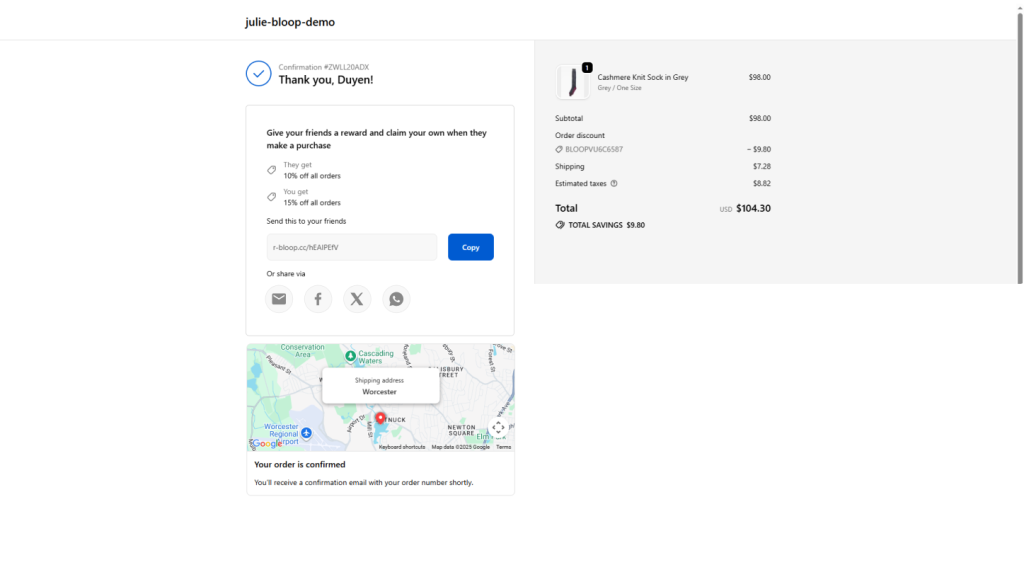
Thank-You Page Pop-Up
Headline: “Your order is on its way! 🎉”
Subhead: Want to save on your next order?
Body: “Give your friends $10 off. Get $10 credit for each friend who buys. It’s our way of saying thanks for spreading the word.”
[Get My Referral Link Button]
Why this works: Customers are still on your site, already in buying mode, and the pop-up feels like a bonus rather than an interruption.
After Positive Review or NPS Survey
Post-5-Star-Review referral Email example
Subject: Thank you for the amazing review, [Name]!
Hi [Name],
We’re thrilled you loved your [product name]! Reviews like yours help other shoppers discover products they’ll love.
Want to share the love with friends?
Give them 20% off their first order. You’ll earn $15 credit for each friend who shops.
[Share with Friends Button]
Your friends get a great deal, you get credit toward your next order, and we get to help more people find products they’ll genuinely love. Everybody wins.
Thanks again for being awesome!
Why this works: Capitalizes on the moment when a customer has just publicly endorsed your brand, making a referral request feel like a natural next step.
Loyalty Milestone & VIP Tier Invitations
VIP Tier Unlock Email
Subject: You’re officially a VIP, [Name]! 👑
Hi [Name],
You’ve just unlocked VIP status! Here’s what that means:
- Early access to new products
- Free shipping on all orders
- Exclusive VIP referral rewards
Your VIP Referral Bonus:
Give friends 25% off (that’s 5% more than regular customers can offer). You’ll earn $20 credit per referral instead of the standard $15.
[Get My VIP Referral Link]
Share with friends who’ll appreciate quality [product category]. The more you share, the more you save.
Why this works: Makes referrals feel exclusive and rewards your best customers with better terms, encouraging them to share more actively.
Win-Back & Re-Engagement Messages
Lapsed Customer Referral Offer
Subject: We miss you, [Name]. Here’s $20 to come back.
Hi [Name],
It’s been a while since your last order. We’d love to see you again, so here’s a special offer:
Refer just one friend and we’ll give you both $20 off your next orders.
No minimum purchase. No expiration. Just our way of saying we value you.
[Share with a Friend Button]
Even if you’re not ready to shop right now, your friends might be. And when they do, you’ll have $20 waiting for your next order.
Why this works: Gives lapsed customers a no-pressure way to re-engage, and the referral credit creates a reason to return when they’re ready.
Social & Mobile Sharing Templates
SMS Referral Prompt
Hey [Name]! Loving your recent order? 😍
Share it with friends and you’ll both save $15 on your next orders.
Tap to share: [short link]
Reply STOP to opt out
Why this works: Short, emoji-friendly, optimized for mobile sharing with a one-tap link.
Instagram DM Template (for customers to copy)
“I just found this amazing [product type] from [Your Store]! Use my link to get $15 off your first order: [link]”
Why this works: Provides ready-to-send copy that customers can paste directly into DMs, removing the friction of composing their own message.
Personalization & Dynamic Messaging Tactics
Shopify Liquid & Merge Tags
Basic personalization uses customer data you already have. Here’s how to implement it:
- Customer name: Hi {{ customer.first_name }},
- Recent order reference: Loved those {{ product.title }} you ordered?
- Days since last order: It’s been {{ days_since_order }} days since your last order
- Total orders: As one of our {{ customer.orders_count }}-time customers
These variables make messages feel individually crafted even when they’re automated. The key is using them naturally, not forcing personalization into every sentence.
Segment-Driven Copy
First-time customers need different messaging than repeat buyers.
First-time customer (focused on validation):
“Just placed your first order? That’s exciting! If you love it as much as we think you will, share it with friends. You’ll both get $10 off your next orders.”
VIP customer (focused on exclusivity):
“As one of our top customers, you get exclusive referral perks. Give friends 25% off and earn $20 per referral (higher than our standard program).”
High-AOV customer (focused on premium positioning):
“Appreciate quality? Your friends probably do too. Share your favorite finds and you’ll both save $25 on your next premium orders.”
Each segment gets messaging that matches their relationship with your brand.
Dynamic Reward Phrasing
Adjust your offer based on customer value or product margins.
- Standard customer: “Give $10, Get $10”
- Customer with AOV above $150: “Give $20, Get $20”
- Customer who bought high-margin products: “Give 25% off, Get $25 credit”
This requires segmentation in your email platform, but the ROI justifies the setup time. You’re not over-discounting for customers who would refer anyway, while offering stronger incentives to high-value customers.
Automating Referral Messaging in Shopify Workflows
Order Confirmation & Thank-You Email Integration
Most Shopify email apps (Klaviyo, Omnisend, Mailchimp) let you add referral blocks to existing flows.
Implementation steps:
- Open your order confirmation email template
- Add a new content block after order details
- Insert your referral message and CTA button
- Link the button to your referral program URL with the customer’s unique code
Pro tip: A/B test placement. Some stores find better results with referral messages at the top of thank-you emails, others see higher conversions when it’s positioned after order details.
Post-Review & NPS Survey Auto-Triggers
Set up conditional logic: If review rating = 5 stars, send referral message 24 hours later.
Klaviyo example flow:
- Trigger: Customer submits review
- Conditional split: If rating ≥ 4 stars
- Wait 1 day
- Send referral message email
This ensures you’re only asking satisfied customers to refer, which protects your brand reputation and increases conversion rates.
Loyalty Program & Account Page Widgets
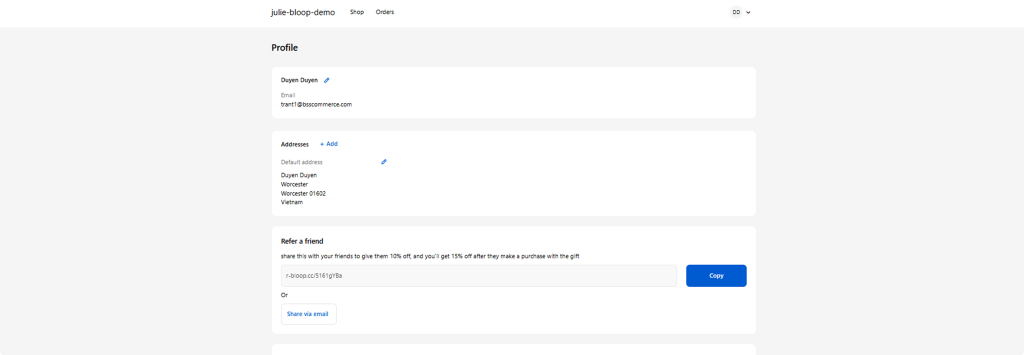
Add a persistent referral widget to customer account pages. Customers who log in to track orders will see their referral link and current rewards balance.
What to include:
- Unique referral link (auto-populated)
- One-click social sharing buttons
- Current referral count and rewards earned
- Clear explanation of how the program works
Tools like Bloop referrals & affiliates, Smile.io or Yotpo integrate these widgets directly into Shopify account pages with minimal coding required.
SMS & Push Notification Workflows
SMS referral messages should be brief and action-oriented.
Timing: Send 48 hours after delivery confirmation.
Example: “Hey [Name]! How’s your [product]? Love it? Share with friends and you’ll both get $15 off. Tap: [link]”
Push notification (for customers with your app installed):
“Your order arrived! 🎉 Share with friends to earn $15 credit. [Tap to share]”
Keep SMS and push notifications short. The goal is a quick tap, not a detailed explanation.
Packing Slip & In-Box Insert Suggestions
Physical referral prompts work surprisingly well, especially for products that get unboxed on camera or in front of friends.
Packing slip addition:
“Love your order? Share the joy!
Give friends $15 off their first order.
You get $15 credit when they shop.
Visit: [YourStore.com/refer] or scan:
[QR code]”
Insert card design tips:
- Make it visually distinct from packing materials
- Use a QR code for easy mobile scanning
- Keep copy minimal (people won’t read paragraphs)
- Include both the URL and QR code for flexibility
Testing, Measuring & Optimizing Referral Messages
Key Metrics to Track
- Share-through rate: Percentage of customers who click your referral CTA. Benchmark: 8-15% for post-purchase messages, 20-30% for post-positive-review messages.
- Referral conversion rate: Percentage of shared links that result in purchases. Benchmark: 10-20% depending on offer strength.
- Revenue per referral message sent: Total referral revenue divided by number of messages sent. This is your north star metric.
- Customer Lifetime Value (LTV) uplift: Compare LTV of referred customers vs. non-referred customers. Referred customers should show 20-40% higher LTV.
- Referrer retention: Do customers who successfully refer friends stick around longer? Track retention curves for referrers vs. non-referrers.
A/B Testing Framework
Test 1: Reward structure
- Version A: Give $10, Get $10
- Version B: Give 20%, Get $15 credit
- Measure: Share-through rate and conversion rate
Test 2: Message timing
- Version A: Immediately after purchase
- Version B: 24 hours after delivery
- Measure: Share-through rate and referral conversion
Test 3: Copy approach
- Version A: Benefit-focused (“Save $15 on your next order”)
- Version B: Social proof (“Join 5,000+ customers sharing with friends”)
- Measure: Click-through rate and shares
Test 4: CTA placement
- Version A: Referral message at top of email
- Version B: Referral message after order details
- Measure: Overall engagement and share rate
Run tests for at least two weeks or until you reach statistical significance (typically 1,000+ email opens per variant).
Legal, Compliance & Brand-Trust Checklist
Required Disclosures
Email compliance:
- Include physical mailing address
- Add clear unsubscribe link
- Honor opt-out requests within 10 days
- Avoid misleading subject lines
SMS compliance:
- Get explicit opt-in before sending
- Include STOP instructions in every message
- Never send promotional SMS without consent
- Keep frequency reasonable (max 4-6 per month)
Referral terms:
- State any limitations clearly (minimum purchase, expiration dates)
- Disclose what happens if a referred friend returns their order
- Explain how and when rewards are delivered
Privacy & Data Handling Best Practices
When customers share referral links, they’re trusting you with their friends’ information.
Best practices:
- Don’t email referred friends without their consent
- Don’t add referred emails to your main list automatically
- Store referral data securely
- Let customers see who they’ve referred and opt-out of tracking
- Be transparent about how referral data is used
Red flags to avoid:
- Automatically subscribing referred friends to your newsletter
- Sending multiple follow-ups to people who didn’t opt in
- Sharing referral performance data publicly without permission
Tone & Authenticity Guidelines
Referral messages should sound like your brand, not a corporate marketing department.
- Authentic: “Love your new sneakers? Your friends might too. Share your link and you’ll both save $15.”
- Spammy: “URGENT: Share now to unlock EXCLUSIVE rewards! Limited time only!”
- Authentic: “Thanks for your order! If you end up loving it, feel free to share with friends.”
- Spammy: “You MUST share this with 10 friends to maximize your savings potential!”
Match your brand voice. A luxury skincare brand should sound different than a streetwear shop. Keep it conversational, avoid all-caps and excessive exclamation points, and never pressure customers to share.
Tools & Resources to Accelerate Your Referral Program
Shopify Native Features vs. Third-Party Apps
Referral apps:
- ReferralCandy: Best for stores wanting deep customization and advanced fraud prevention
- Smile.io: Combines referrals with loyalty points and VIP tiers
- Yotpo: Integrates referrals with reviews and user-generated content
- Bloop: Focused on automated, revenue-optimized referral messaging
>> Check our newest article about The 12 Best Shopify Referral Apps 2026 for more information
Email & SMS platforms:
- Klaviyo: Powerful segmentation and personalization for referral messages
- Omnisend: Good balance of features and affordability
- Postscript: SMS-focused with strong referral integration
Loyalty platforms:
- LoyaltyLion: Combines points, referrals, and VIP tiers
- Growave: All-in-one reviews, loyalty, and referrals
Choose based on your current stack. If you’re already using Klaviyo for email, look for referral apps that integrate seamlessly rather than building a separate messaging system.
How Bloop Helps Shopify Stores Scale Referrals
While this guide gives you the frameworks and templates to build effective referral messages, execution still requires significant time and testing. Bloop automates the heavy lifting.
The app analyzes your customer data to determine optimal send times, automatically segments customers for personalized messaging. Instead of manually building flows for every touchpoint, Bloop deploys referral messages across email, SMS, and on-site widgets based on customer behavior.
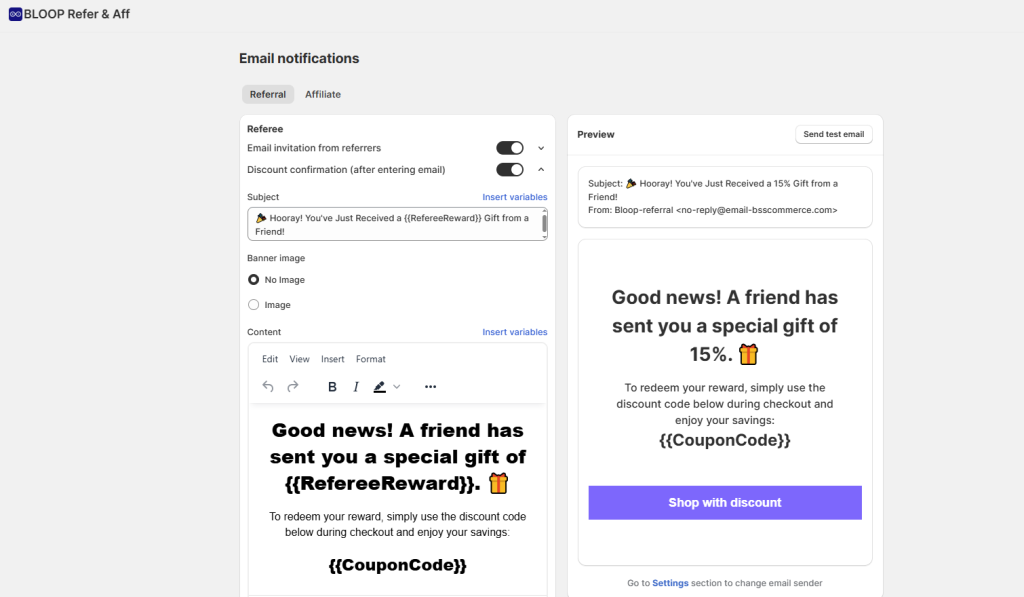
Merchants using Bloop typically see referral revenue increase 2-3× within 60 days because the app handles the optimization work that most stores don’t have time to do manually. It’s built specifically for Shopify, integrating with your existing email platform like Klaviyo and Mailchimp.
If you want to implement the strategies in this guide without spending weeks on setup and testing, Bloop is worth exploring.
Conclusion
Referral messages are not just “nice to have” marketing touches. They’re direct revenue drivers that turn your happiest customers into your most effective acquisition channel.
The difference between referral programs that generate 2% of revenue and those that drive 15-20% comes down to message quality, timing, and optimization. Generic templates sent at random times won’t move the needle. Personalized, well-timed messages that match customer behavior and emotions will.
Start with the templates in this guide. Pick one customer touchpoint (post-purchase is usually the easiest win), implement a clear message with strong rewards, and measure your results. Once you see traction, expand to other touchpoints and begin testing variations.
Your customers already want to share products they love. Your job is to make it easy, rewarding, and perfectly timed. Get the messaging right, and referrals become one of your most profitable growth channels.

Hien Tran
Hien Tran is a Product Marketing specialist at Bloop, where she translates product features into growth-driven solutions for Shopify merchants. By combining market insights with clear messaging, Hien ensures that store owners not only understand Bloop’s value but also know how to apply it to boost revenue, loyalty, and customer acquisition.